Courses offered on Oct 3rd Professional Learning Day
Below are the courses offered on the October 3rd Professional Development Day. Some courses are only offered to certain groups. Be sure to record what courses you sign-up for.

Compass Learning/Odyssey 101
Compass Learning Odyssey is a sophisticated instructional management system with browser-based curriculum and comprehensive assessments to which the schools in San Leandro have access. Compass Learning Odyssey includes exciting graphics, interactive animation, creative sound design and hands-on activities that engage students and envelop them in a unique learning experience. It can be used as an instructional supplement, for intensive intervention, or to enhance whole-group instruction. This session will focus on the basics of Odyssey including class set-up, assignment building, and basic reporting. Please join us to learn more about this exciting instructional resource!Attention Teachers: Please bring your class rosters to this course to build your classes. |
- Presenters: Margo Green, Bekki Atwood, Millie Tavarez-Aponte, Raquel Ford, and Vickie Hicks.
- Audience: SLTA-General and Administrators
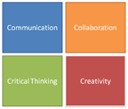
21st Century Learning, Innovation, and Skills
Come and learn about the “Super Skills” for the 21st century!- Communication: Sharing thoughts, questions, ideas, and solutions.
- Collaboration: Working together to reach a goal- putting talent, expertise, and smarts to work.
- Critical Thinking: Looking at problems in a new way, linking learning across subjects & disciplines.
- Creativity: Trying new approaches to get things done equals innovation & invention.
- Presenters: SLUSD's Instructional Coaches
- Audience: SLTA-General and Administrators

Discovery Education
Discovery Education Streaming Plus: An Overview
This course is no longer available for any Block times. All seats are filled.
In this session, participants will examine the ways in which Discovery Education Streaming Plus supports multiple learning modalities with content that is easy to integrate, aligned to standards and always current. Participants will learn how to seamlessly link lesson objectives to digital media and search for content based on tags, standards, keywords, media types and grade levels.
Digital Literacy in the Classroom
In this session, participants will explore the role of digital content and digital literacy in the classroom. Educators will investigate and discuss what the research and experts are saying about the changing landscape of digital literacy and its implications for the modern classroom. Participants will learn the importance of utilizing digital media effectively in the classroom and its impact on learning and achievement. Media infused lessons, activities that engage learners and techniques for helping students problem solve and think critically will be shared.Evidence-Based Reading, Writing, and Thinking: Supporting Claims with Evidence
This course is no longer available for any Block times. All seats are filled.
Using specific curricular examples, educators will develop strategies that teach students to support their thinking with evidence. Teachers will take part in a critical reading experience through the lens of a student for the purpose of examining the author’s claim. They will explore several instructional strategies and digital tools used to develop students’ ability to identify the author’s claim, find supporting evidence, and interpret the text.
- Audience: SLTA-General & Site Administrators

Google Mail and Calendar
(Basics through Intermediate)This webinar will be hosted in a variety of rooms and sessions. It is targeted for Basics through the Intermediate users. Since this is a webinar, it will not be a hands-on activity. No device will be required.
- Presenter: SADA Systems
- Audience: All SLUSD employees
Google Drive
(Basics through Intermediate)This webinar will be hosted in a variety of rooms and sessions. It is targeted for Basics through the Intermediate users. Since this is a webinar, it will not be a hands-on activity. No device will be required.
- Presenter: SADA Systems
- Audience: All SLUSD employees
BLOCK 3 is ONLY for Principals and Site Admins.
Attention Principals & Site Admins: you are required to register for PBIS in Block 3
Attention Principals & Site Admins: you are required to register for PBIS in Block 3
PBIS
(Secondary and Elementary)Positive Behavior Interventions and Supports (PBIS) is a preventative strategy for shaping student conduct through the recognition and acknowledgement of expected behaviors. Participants will be challenged to think differently about current approaches to working with students with challenging behaviors. This session will cover the framework for PBIS and the strategy for implementation in the San Leandro Unified School District.
- Presenter: John Eyler
- Audience: SLTA-General, Principals (Block 3 Only)

This course is no longer available for any Block times. All seats are filled.
Culture and Behavior Intervention:
How do we work together? How does a teacher establish a culture that promotes teaching and learning through challenging scenarios?
Positive Behavior Supports in the Classroom: This session is designed for general education and special education classroom teachers and administrators looking for a proactive approach to ending challenging behavior. Participants will be able to explain the three-tiered model of school-wide discipline, understand the ABCs of behavior, describe positive reinforcement and articulate what it looks like in the classroom, describe Tier 1 strategies, and know when to call the Behavior Specialist. Please bring your laptop and any BIPs you are expected to implement (please hide all identifying student information).
- Presenter: Kimberly McFadden
- Audience: SLTA-General & Administrators (Block 1 and 2)
Attention: Building Excellent Behavior Plans is for SPECIAL ED TEACHERS AND STAFF ONLY.
Building Excellent Behavior Plans
Not All Behavior Intervention Plans are Created Equal: This session is designed for special educators including resource and special day class teachers, speech and language therapists, school psychologists, psychology interns, program specialists, and administrators. Participants will be able to describe the essential components of a legally defensible behavior intervention plan (BIP), troubleshoot a failed BIP, identify the four possible functions of behavior, write functionally equivalent replacement behavior goals, and know when to call the Behavior Specialist. Please bring your laptop and examples of behavior goals you've written or inherited (please hide all identifying student information).
- Presenter: Kimberly McFadden
- Audience: Special Ed Staff (Block 3 Only)

Naviance - 3 Sessions
COUNSELORS ONLY and all day sessions
Session 1:
Career Planning and Assessments with Naviance
This course provides participants with an overview of the Career Planning tools in Naviance. These tools allow students to realize their goals, skills, knowledge, values, constraints and interests to help them make better academic decisions. During this process, students gain a clear understanding of the academic preparation required to pursue careers that are likely to be fulfilling to them.
Session 2:
College Planning: College Research Tools
This course provides participants with an overview of the college research tools available in Naviance and Family Connection. The college research tools in Naviance are meant to help students find colleges that are the right fit. You can create the framework for students’ college research by determining which features you want to enable by
grade level, customizing the college research process for students. This course is designed to introduce you to all the research tools available while allowing you to reflect on which tools you want to use.
Session 3:
College Planning: Application Tools
This course provides participants with an overview of the college application process as it’s managed in Naviance. Naviance brings the common tasks involved with college planning into one system. When you use Naviance to manage the college application process, it keeps an electronic record of college application materials.
- Presenter: Amy Kalkstein
- Audience: SLUSD Counselors
This event is presented by:
Educational Services Division

Copyright © 2014 San Leandro USD, Educational Services Division. All Rights Reserved.